We just added some really cool features to Tiggzi Platform. Check them out!
New Source view
As we continue to make Tiggzi Platform enterprise-level, just just added a Source view where you can see and open the actual files behind your app. Right now the files are opened as read-only but we are working on allowing you to modify them as well.
jQuery Mobile themes
We got all our custom themes back and you can also create new themes using the jQuery Mobile ThemeRoller tool. Simply create your theme in the tool, download and then upload to Tiggzi. It’s that simple.
A very nice feature in Tiggzi app builder is the ability to quickly build (package) your app for Android or iOS:
You can also easily export the app source for Android, iOS, and Windows Phone 7.
When you a get a binary (.ipa) file form Tiggzi build service, it’s targeting iPhone 4 (we are working on complete iPhone 5/iOS 6 support). However, you can still build for iPhone 5/iOS 6 if you export the app source and build the app in xCode. Here is how to do it.
Export xCode project
Open the downloaded project in xCode 4.5
Change PhoneGapTemplate target settings: “Deployment Target” to 4.3
Change CordovaLib project settings: “Deployment Target” to 4.3
Change PhoneGapTemplate project settings: ”Architectures” to armv7
Change CordovaLib project settings: ”Architectures” to armv7
Build the project
Run it on the device or iPhone 6 simulator
Image update
You still need to manually create image [email protected] (640 x 1136 pixels) and link it in XCode settings to your project. Thanks to Eric for this update.
When you build an HTML5/jQuery Mobile app in Tiggzi, you can instantly host the app. Every plan gets hosting. Yes, even the Free plan.
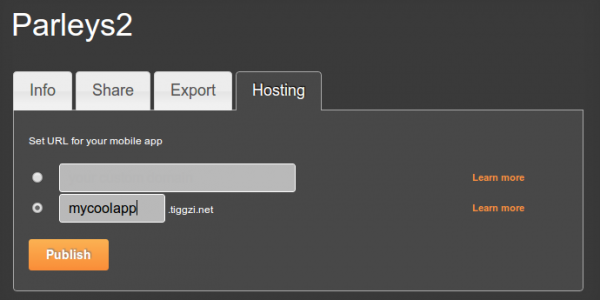
Simply go to Hosting tab. You can use app-name.tiggzi.net domain or a complete custom URL if you own a domain.
You can also publish the app right form the builder. If you don’t see that option, go to Hosting tab and convert the app to mobile web type (the default new app comes with PhoneGap. Such app cannot be published as it might be using native device features).
We just released some really awesome features in Tiggz!
App Builder Database Integration
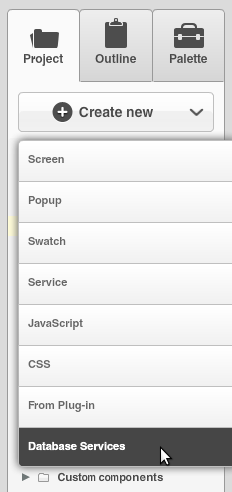
In early July we launched Tiggzi Database where you can store app data. Now we have launched database integration in our app builder. This means you can point to a specific database, select the collection(s) you want to use and automatically generate all the REST services. To create a services from database, select Create New > Database Services:
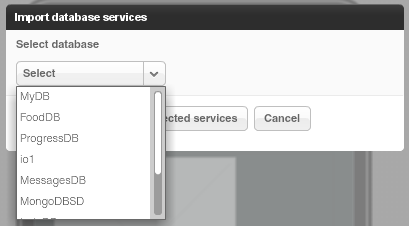
Next select the database:
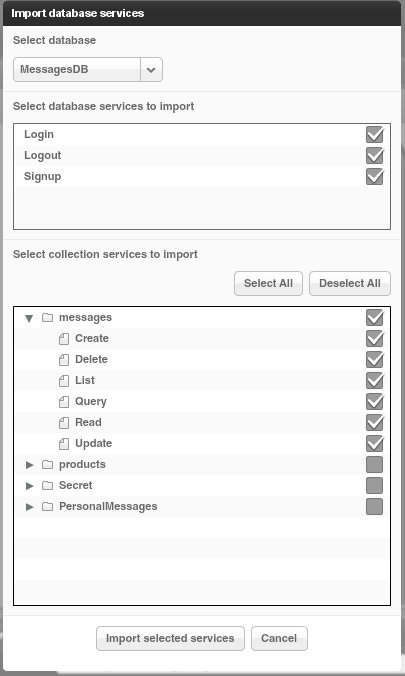
Once the database is selected, you can select the services for which you want to generate REST services.
The first section creates REST services for User management.
The second section lists all the collections you have in current database. You can then select which actions (Create, Delete, etc) you would like to create for a particular collection:
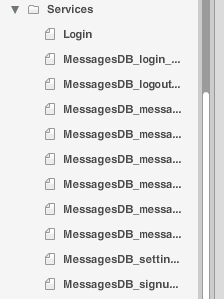
When you click Import selected services button, the following REST services will be generated:
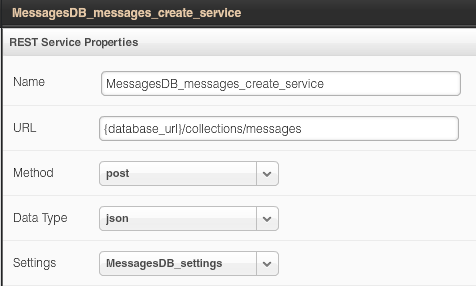
For example opening the service for creating a new message looks like this:
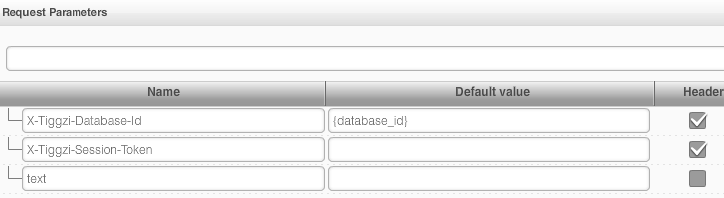
The request and response parameters are also generated. Here is a screen shot of request parameters to create a new messsage:
Isn’t this awesome?
File API
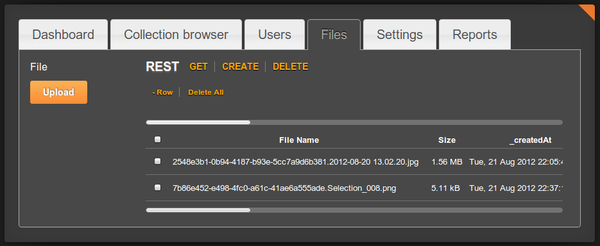
We continue to add new features to Tiggzi Backend Services by adding File API. You can now easily store files in the database. When you open any database, you will see a new Files tab:
Read more about the File API.
Project Export/Import
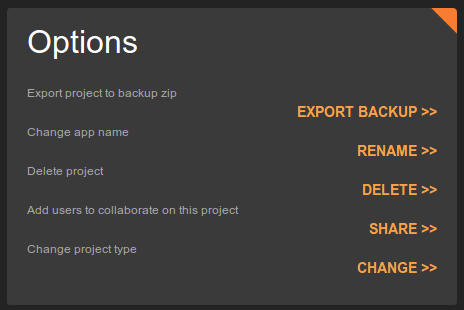
Our users have been asking for this feature for a long time and it’s now available. You can export and then import a project. To export a project, go to app options page (Export Backup):
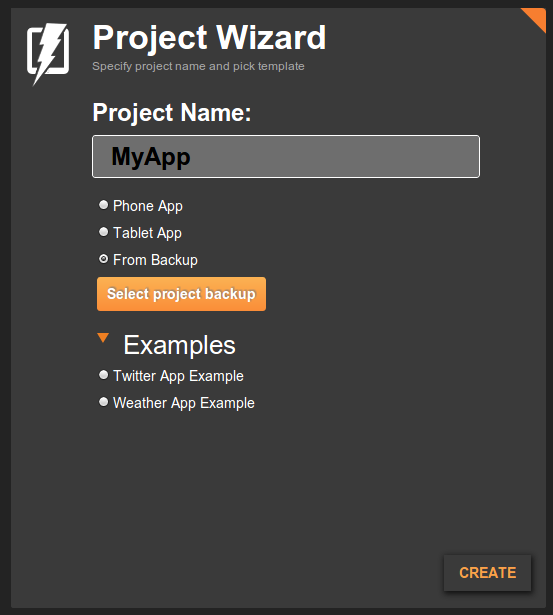
To import an app from backup, click From Backup when creating a new app (you get to this screen by clicking More Options link, see next section):
Even easier way to create a new app
Last, but not least, it is now even easier to create a new app. Right from Apps page, enter a new app name and click Create. That’s it.
Integration with Tiggzi Database inside the app builder. When creating a new service, you will be able to point to any existing database collection that you created and auto-generate REST API services such as to display data, create data, or delete data.
Database: File storage API will allow to store files in the database.
Export/import of projects - our users have been asking for this for a long time.
Easier testing and installing: QR code on test page and on Android build page. Having the QR code on Android build page will allow you to install the app on your phone by simple scanning the code.
Easier project creation: create new app right from Apps page
Lastly, our very big new feature is our new HTML5 app builder we have been working on for a few months now. I’ll be posting information on it soon.
We got some really cool stuff out this week. Check it out.
Better way to test your app
When you open the app builder you should see a new and very nice phone frame:
The old one was more Android-like. The new one is neither Android, iPhone or Windows Phone. Just a nice phone frame.
There is an upgraded test page:
You can use the new tool bar at the top to change the phone orientation as well as change the size:
That’s not all. We also now have an option to test the app without the mobile frame. In the Test pop-up, uncheck Show in mobile frame:
When you open the app, it won’t use the frame:
The frame looks nice in the browser, but technically speaking testing without the frame is better — as you are testing the actual app (just the app code, no frame). Of course when you run the app on your device, the frame is not there as well.
jQuery Mobile Multi-page Template
jQuery Mobile supports multi-page templates where two or more pages are placed inside the same file. You can now turn on this features in Tiggzi app builder (it’s turn off by default). Go to Project > Project Profile:
Queries In Database Console
Tiggzi Database comes with Queries support (docs) and now you can try the queries right from the collection console:
Showing products that cost more than $30 (or any other currency):
PhoneGap Upgrade
We upgraded to PhoneGap version 1.8.1. Every new and existing app will now use this new version of PhoneGap.
Android 4.0.x
We also added build support for Android 4.0.x
As always, we want to get your feedback. You can always email us ([email protected]) or post on our forum.
In addition to Tiggzi Database (which is a pretty big feature), there are a few other features we added back in June.
Simpler app creation
We greatly simplified new app creation wizard. Just enter the app name and select whether you want a phone or tablet app. That’s it.
By default Tiggzi creates an app that includes Apache Cordova (PhoneGap). This means you can export the app to Android, iOS, and Windows Phone. You can also use any device API Apache Cordova provides.
We are going to simplify the app creation even more in the next release.
You might be wondering but what about mobile web app hosting? If you use any native device feature, then hosting as a mobile web app doesn’t make sense. But if you didn’t use any native features, then you want to be able to host. If you go to app options, you can now switch the app type from mobile app (hybrid) to mobile web by clicking Change for Change project type:
Select the new type and click Save:
Once you switch the project type to Mobile Web, publish option will be enabled on the same page:
and also in the builder:
Simpler access to app settings
To access app settings you had to go to Project view, then Project > Project Profile. Now you can access project settings from the top level menu:
Project settings editor is divided into four panels:
General - for setting app name, description, start page and selecting a theme
External resources - for adding 3rd party JavaScript librararies
Android binary APK properties
iOS binary API properties
Faster
We made changes how Tiggzi web site and builder work so things should be running faster.
New List component options
Check out the List component, we added more option that you can configure from properties. If something is still missing, you can always use More Properties feature. Our goal is to make the list as configurable via properties as you can do in source code.
We are super excited the announce the availability of Tiggzi Database (beta). Tiggzi Database is a cloud database that provides a backend and storage for your mobile app. You already know that any using 3rd party REST API is very easy in Tiggzi app builder. Every REST API provides some specific functionality. For example, if you use Facebook API you can easily post a message to the timeline, but what happens if you need to store data specific to your app? Let’s say you are building a todo app - where can you store the list of things to do? That’s exactly where Tiggzi database comes in. It comes with elegant REST APIs so you can easily show, create, edit, and delete app data. Tiggzi database comes with built-in User Management. It’s powerful, scalable and easy to use. It works seamlessly with Tiggzi app builder.
You can access Tiggzi database today at http://io.tiggzi.com. From tiggzi.com, go to My Account, then click on Database.
On the first page you can see a lit of all your databases, you can also create a new database:
Once you select a database, you will see all the collections in the database:
A very nice feature is that you get curl command hints. This will enable you to define a service in Tiggzi app builder very quickly:
In Tiggzi app builder, defining a service is as simple as this:
Keep in mind that this service is still in beta. We got a lot more features we want to add, such as push, analytics and server-side code. Database docs are here. We also would love to hear your feedback. Let us know of the forum, email, Twitter or Facebook.