Posted: December 19th, 2012 | Author: max | Filed under: API, Database, jQuery Mobile, New release, PhoneGap, Tutorials, Windows Phone | Tags: Database, jQuery Mobile, PhoneGap, release, tutorials, Windows 8 | No Comments »
Windows 8 Support

Tiggzi’s new HTML5 app builder has been the default builder for the past couple of weeks and we continue to update it with new features. One such feature is new Windows 8 support. In addition to jQuery Mobile/PhoneGap apps, you can now build Windows 8 apps with native support such as Snap View, Search Charm, Share Charm, and Live Tile.
To create a new Windows 8 app, click the “More create options” link from the Apps page and then select Windows 8 App as the app type. Try our Windows 8 app tutorial.
jQuery Mobile 1.2
We also upgraded to a much better jQuery Mobile version 1.2.

PhoneGap 2.2
We also upgraded PhoneGap to version 2.2. This means Tiggzi’s cloud build has also been upgraded to PhoneGap 1.2:

If you use Tiggzi Mobile App Tester for Android - go and grab an update so it also uses the latest PhoneGap version.
Push Notifications
A long requested feature - Push Notifications feature has been added to Tiggzi Backend Services.

Want to try it? Try our new Push tutorial.
New Tutorial: Building a ToDo App with Tiggzi Backend Services
Build this app and learn how the app builder is fully integrated with backend services.
Posted: August 21st, 2012 | Author: max | Filed under: API, Database, Features, Mobile Backend, New release | Tags: API, Database, features, release | 6 Comments »
We just released some really awesome features in Tiggz!
App Builder Database Integration
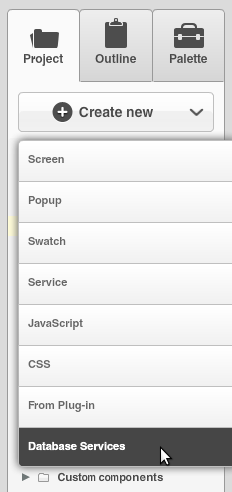
In early July we launched Tiggzi Database where you can store app data. Now we have launched database integration in our app builder. This means you can point to a specific database, select the collection(s) you want to use and automatically generate all the REST services. To create a services from database, select Create New > Database Services:
Next select the database:
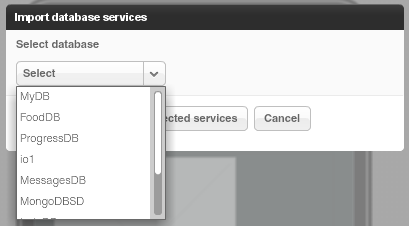
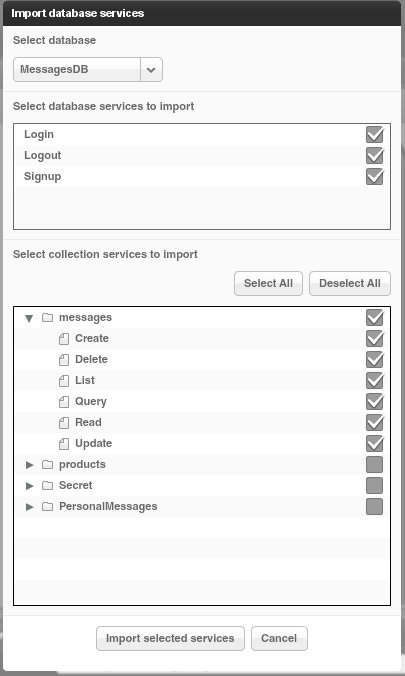
Once the database is selected, you can select the services for which you want to generate REST services.
The first section creates REST services for User management.
The second section lists all the collections you have in current database. You can then select which actions (Create, Delete, etc) you would like to create for a particular collection:
When you click Import selected services button, the following REST services will be generated:
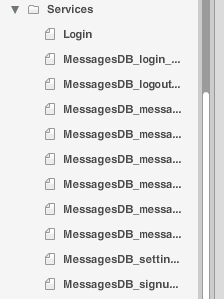
For example opening the service for creating a new message looks like this:
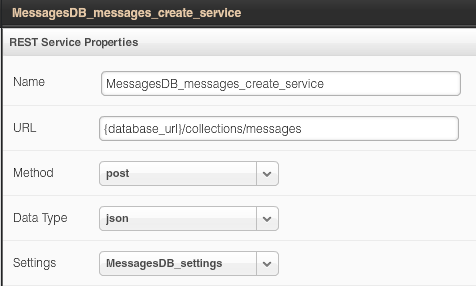
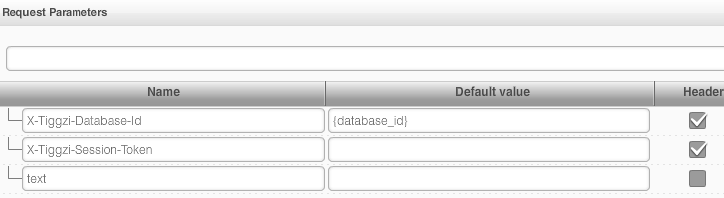
The request and response parameters are also generated. Here is a screen shot of request parameters to create a new messsage:
Isn’t this awesome?
File API
We continue to add new features to Tiggzi Backend Services by adding File API. You can now easily store files in the database. When you open any database, you will see a new Files tab:
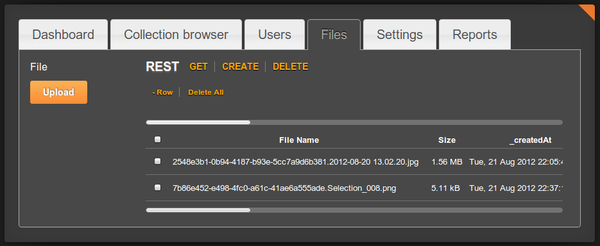
Read more about the File API.
Project Export/Import
Our users have been asking for this feature for a long time and it’s now available. You can export and then import a project. To export a project, go to app options page (Export Backup):
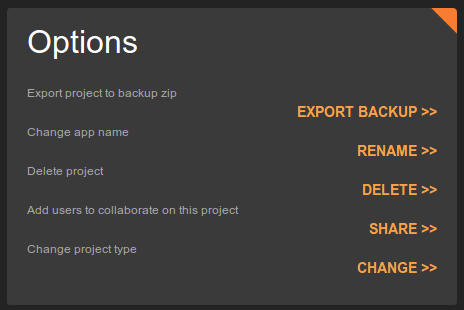
To import an app from backup, click From Backup when creating a new app (you get to this screen by clicking More Options link, see next section):
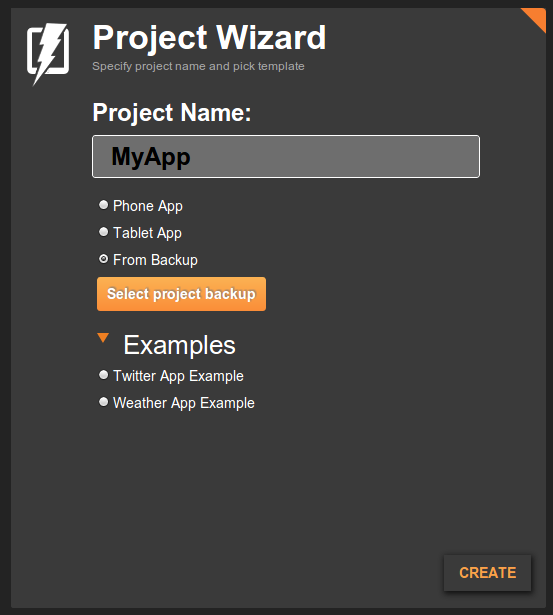
Even easier way to create a new app
Last, but not least, it is now even easier to create a new app. Right from Apps page, enter a new app name and click Create. That’s it.

Posted: July 24th, 2012 | Author: max | Filed under: Database, Features, jQuery Mobile, New release, PhoneGap | Tags: Database, features, jQuery Mobile, PhoneGap, release | No Comments »
We got some really cool stuff out this week. Check it out.
Better way to test your app
When you open the app builder you should see a new and very nice phone frame:

The old one was more Android-like. The new one is neither Android, iPhone or Windows Phone. Just a nice phone frame.
There is an upgraded test page:

You can use the new tool bar at the top to change the phone orientation as well as change the size:

That’s not all. We also now have an option to test the app without the mobile frame. In the Test pop-up, uncheck Show in mobile frame:

When you open the app, it won’t use the frame:

The frame looks nice in the browser, but technically speaking testing without the frame is better — as you are testing the actual app (just the app code, no frame). Of course when you run the app on your device, the frame is not there as well.
jQuery Mobile Multi-page Template
jQuery Mobile supports multi-page templates where two or more pages are placed inside the same file. You can now turn on this features in Tiggzi app builder (it’s turn off by default). Go to Project > Project Profile:

Queries In Database Console
Tiggzi Database comes with Queries support (docs) and now you can try the queries right from the collection console:

Showing products that cost more than $30 (or any other currency):

PhoneGap Upgrade
We upgraded to PhoneGap version 1.8.1. Every new and existing app will now use this new version of PhoneGap.
Android 4.0.x
We also added build support for Android 4.0.x
As always, we want to get your feedback. You can always email us ([email protected]) or post on our forum.
Posted: July 18th, 2012 | Author: max | Filed under: API, Database, Mobile Backend, Plugin | Tags: API, Database, Mobile backend, Plugin | No Comments »
Last weekend we participated in the AT&T Mobile Hacktathon hosted by StackMob. Just before the event we published StackMob API plug-in in Tiggzi app builder so that it would be very simple to connect to StackMob. Here is how easy it is to connect to StackMob.
In Tiggzi app builder, select Create New > From Plug-in, then select the StackMob plug-in:

When you click to import the plug-in, you will be asked to enter StackMob key that identifies your app:

If you won’t enter the key right away, you can always set it by going to Services/StackMobDatabseSettings file.
The StackMob service looks like this:

You will notice that the URL has [objectName] in it. Simple set it to the object schema name defined in StackMob. My object is called messages so the updated URL would be this:
https://api.mob1.stackmob.com/messages
The service does a GET by default but you can set it to do any other action.
We can now instantly test the service. Open Request Parameters panel and click Test Connection:

We get result back which means our service works (you should create a few sample objects in StackMob before testing). The service input is defined, we now need to define the service output. That can be done automatically by clicking Populate Response Structure button.

Once the service is ready, add it to the page, and bind the service to the UI:

and finally run the app:

Posted: July 16th, 2012 | Author: max | Filed under: API, Database, Mobile Backend | Tags: API, Database, Mobile backend | No Comments »
In case you missed we just launched Tiggzi Database - a cloud database for your mobile app. It’s the first feature as part of our mobile backend services. We are working on really cool stuff such as Push and more!
Database API Plug-in
Creating a new service based on Tiggzi Database is very simple as each collection comes with a nice REST API hints:
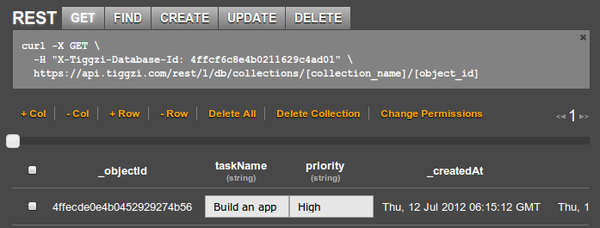
But there is even easier way to add a service by using Tiggzi Database API plug-in. From Project tab, click Create New > From Plug-in and select Tiggzi Database API plug-in:
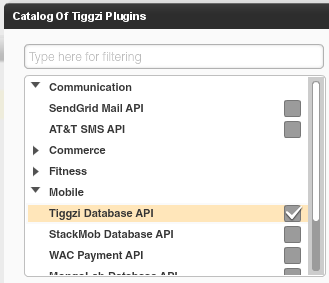
When you import the plug-in, you will be asked to enter the Tiggzi Database Id you can get from the REST API hint section (or from Dashboard tab). If you don’t set it during import, you can always set in Services/TiggziDatabaseSettings file.
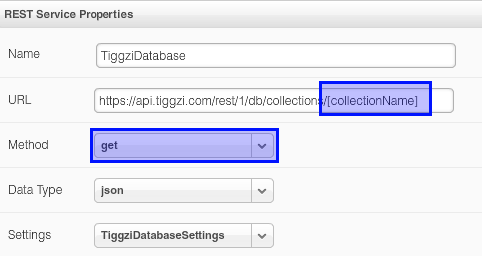
As you can see the URL is already set. Just set the collection and you will be ready to go. The service defaults to GET but you can change it to any method as shown. You can switch to Request Parameters, enter any request parameters and click Test. From Test, you can automatically define the service’s response structure.
The database key is also set in Request Parameters panel:
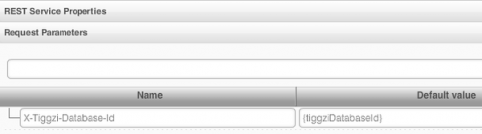
The {tiggziDatabaseId} is resolved from Services/TiggziDatabaseSettings file.
We got some really awesome integration planned very soon. Right from Tiggzi app builder you will be able to browser and create new collections.
Documentation
Looking for docs? View Tiggzi Database docs. We are also working on some really nice tutorials. If you have any questions, you can always email us or post on our forum.
Posted: July 11th, 2012 | Author: max | Filed under: Database, Features, New release | Tags: Database, features, release | No Comments »

We are super excited the announce the availability of Tiggzi Database (beta). Tiggzi Database is a cloud database that provides a backend and storage for your mobile app. You already know that any using 3rd party REST API is very easy in Tiggzi app builder. Every REST API provides some specific functionality. For example, if you use Facebook API you can easily post a message to the timeline, but what happens if you need to store data specific to your app? Let’s say you are building a todo app - where can you store the list of things to do? That’s exactly where Tiggzi database comes in. It comes with elegant REST APIs so you can easily show, create, edit, and delete app data. Tiggzi database comes with built-in User Management. It’s powerful, scalable and easy to use. It works seamlessly with Tiggzi app builder.
You can access Tiggzi database today at http://io.tiggzi.com. From tiggzi.com, go to My Account, then click on Database.
On the first page you can see a lit of all your databases, you can also create a new database:

Once you select a database, you will see all the collections in the database:

A very nice feature is that you get curl command hints. This will enable you to define a service in Tiggzi app builder very quickly:

In Tiggzi app builder, defining a service is as simple as this:

Keep in mind that this service is still in beta. We got a lot more features we want to add, such as push, analytics and server-side code. Database docs are here. We also would love to hear your feedback. Let us know of the forum, email, Twitter or Facebook.