New Features In Tiggzi - You Can Be Mobile In Minutes [Webinar recording]
Posted: June 18th, 2012 | Author: max | Filed under: Events, Features, Webinar | Tags: events, features, webinar | No Comments »Check out other Tiggzi videos.
Check out other Tiggzi videos.
Tiggzi Mashable coverage:
Also check out recent Tiggzi coverage by TechCrunch and Technorati.
Today and tomorrow Tiggzi will be at the AT&T Mobile App Hackathon, NxNE Interactive Festival, in Toronto.
Tiggzi was covered by two very popular technology sites:
In addition to AT&T SMS API Plug-in, we just made available AT&T mHealth API Plug-in in Tiggzi app builder.
mHealth gives you control over your health and wellness data and makes that data more accessible than ever before. With a rich ecosystem of supported devices and applications, mHealth enables you to manage your personal health and wellness from the palm of your hand, anytime, anywhere
Source: https://mhealth.att.com/what
In addition to REST services, the plug-in has two pages. On the first page there is a button to connect to mHealth. When you click on the button, mHealth login page will be opened. Once you login, you will be redirected back to the app and shown the second page. On the second page a simply REST service is invoked showing to what data access is available. The plug-in is set up with three scopes (/read/health/data/fitbit /read/health/data/poke /health/read/user). mHealth docs shows more available scopes.
To add the plug-in to your app:

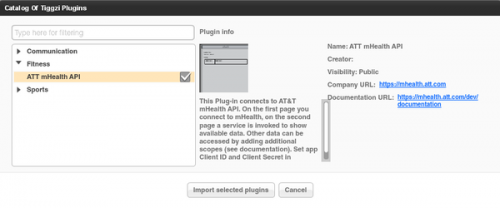
The plug-in is just in time for AT&T Education Hackathon happening today and tomorrow in Palo Alto, CA. Tiggzi team will be there.

Check out this really nice blog/tutorial on how to use Tiggzi to build a mobile app connected to cloud-based MongoDB, written by Ben Wen from MongoLab.

In the past year or so, we have witnessed a major shift from client-server to client-cloud. This shift is primarily fueled by two factors: mobile devices exceeding desktop computers and the thousands of different APIs available on the Internet today. What started in early 2000 on eBay and Amazon has become a real revolution in 2012 with thousands of companies, from Twitter and Facebook to AT&T, offering cloud-based services.
REST API
One of the most common ways to access private or public service APIs is via REST requests.
In the client-server approach an organization builds applications that consume its own internal content and resources. However, even large IT organizations such as AT&T, Verizon and Amazon have come to realize that they are no match for the social consumer and social enterprise developers out there. By making APIs publicly available, these organizations hope that developers and “citizen developers” will come and build applications and mobile apps on top of their services.
Citizen developers at work
Analysts at Gartner see a trend toward app creation independent of IT. They predict that by 2014, citizen developers – employees outside of IT and software development – will build 25% of new business applications. In 2007, they built less than 5%.
One of the best-known API success stories comes from Amazon: Its cloud service APIs let outsiders access the company’s massive data centers. Twitter, with its deceptively simple 140-character message model, exploded thanks to its API. In fact, you probably read and write tweets via a Twitter application or mobile app rather than going directly to Twitter’s Web site. Facebook’s Graph API has spawned a whole industry of apps to support its hundreds of millions of users.
Continue reading
In our May release we upgraded to jQuery Mobile 1.1. This means that the app that you build in Tiggzi is using jQuery Mobile version 1.1. You can always check the version by going to Project view > Projects > Project Profile > Built-in resources:

As you probably know you get jQuery Mobile components in Tiggzi, plus some HTML5 components such as audio, video. There is also Google Maps component. Every jQuery Mobile component comes properties that can be configured. When building an app int Tiggzi, you simply select the component and can see all the properties which can be configured in the Properties view:

For some UI components, not all available properties are available in Properties view. For such cases, Tiggzi comes with a special More Properties button (at the very end):

Via More Properties, you can add any attributes supported by the selected component. In fact, you are not limited to just setting properties which are not exposed in Properties view, you can set any properties. For example, adding these two properties:

will result in this:

Have fun building apps, you now get the full power of jQuery Mobile.
Last week we published the first public Plug-in that allows to send SMS messages via AT&T SMS API. The plug-in also comes with a sample app that you can try. The only thing you need to do is provide your AT&T app information.
There are two ways to import the plugin. You can add the plugin when a new app is created or import into already existing app.


That’s it. We will be adding more plug-ins very soon.